How to Tell When a Part Should Be Redesigned Before Manufacturing
A part can be technically manufacturable and still be unnecessarily expensive or difficult to produce. The difference usually comes down to design decisions made before anyone who makes parts for a living looked at the geometry, tolerances and production requirements.
Manufacturable isn't the same as efficient to make
Most engineers have had the experience. A design passes every review, the model looks clean and the drawing is complete. Then the first quotes come back far higher than expected, or the lead times are longer than the schedule can absorb. Nothing is technically wrong with the part. A capable shop can make it. But making it requires extra setups, special tooling, long machining cycles or slow inspection, all because of choices made on the screen that seemed harmless at the time.
That's the gap between a part that can be manufactured and a part that is designed to be manufactured well. Closing that gap rarely means changing what the part does. It usually means changing how a few features are shaped, toleranced or specified. This article covers the warning signs that a part should be redesigned before manufacturing, how material, geometry and volume shape the best process, when manufacturer feedback can reveal a better approach and how to tell a real engineering requirement from a costly habit.
Why design decisions set most of the cost
A widely cited rule of thumb in product development holds that 70 to 80 percent of a product's manufactured cost is committed during design, through decisions about part count, materials, features and tolerances, even though most of the spending happens later in tooling and production.
The exact figure is debated. An MIT working paper that examined the claim found it is often repeated without strong evidence behind it. But the direction holds: once a design is released, the biggest cost levers are already set, and negotiating with suppliers can only do so much.
That's why getting three quotes on the same design often just confirms what the design costs to make. If the geometry forces long machining cycles or the tolerances demand slow inspection, every capable shop will price that in.
The practical takeaway for design teams is simple. The cheapest time to reduce manufacturing cost is before the drawing is released, while changing a fillet, a tolerance or a pocket depth costs nothing more than a few minutes in CAD.
Warning signs a part should be redesigned
Tolerances tighter than the function needs.
Tight tolerances are expensive. They slow machining, require more careful setups and add inspection time, and they raise scrap rates. A default tolerance block or a habit of tightening "just to be safe" can make every feature cost more than it should. If a feature doesn't mate with anything or affect performance, it rarely needs a tight callout.
Difficult tool access.
Features that a cutting tool can't reach easily, such as undercuts, internal corners in awkward spots or holes at odd angles, often need special tooling, extra setups or a more complex machine. A small change in orientation or geometry can sometimes make the same feature reachable with standard tools.
Deep pockets and sharp internal corners.
Deep, narrow pockets force the shop to use long, slender tools that must cut slowly to avoid chatter and breakage. Sharp internal corners can't be cut with a round tool at all without extra operations. Shallower pockets and generous corner radii usually machine far faster.
Excessive material removal.
When most of a starting block ends up as chips, you're paying for material and machine time that never becomes part of the product. Thin-walled shapes cut from thick stock are a common example, and often a sign that a different process, such as sheet metal, casting or molding, might suit the part better.
Features that complicate setup.
Every time a part has to be unclamped, flipped and re-fixtured, cost and risk go up. Features scattered across many faces, or datums that are hard to hold, can turn a simple part into a multi-setup job. Grouping features so they can be reached from fewer directions often makes a big difference.
How material, geometry and volume shape process and cost
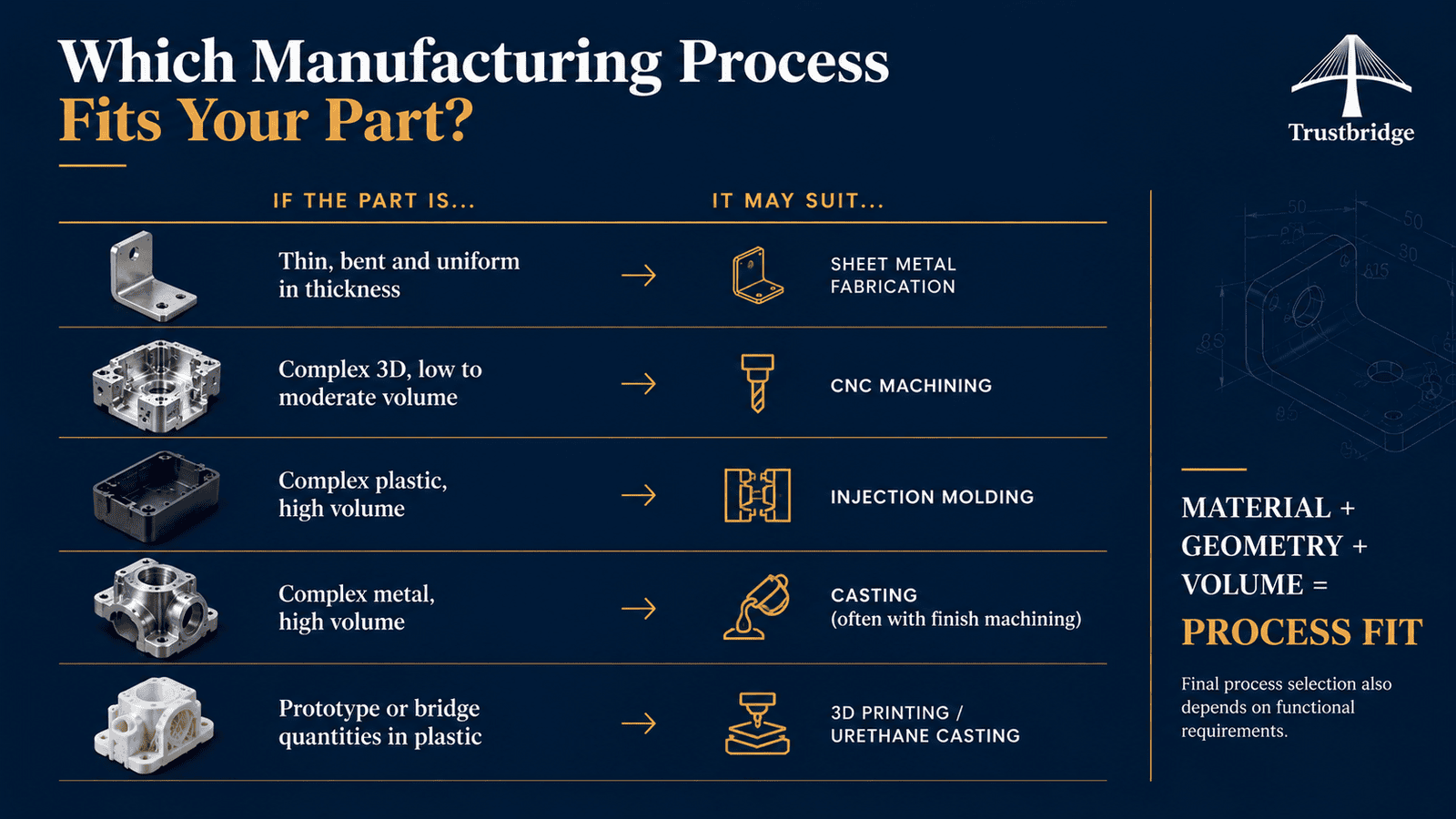
The right manufacturing process isn't chosen in isolation. It comes from three design inputs working together, and changing any one of them can change the best way to make the part.
Material.
Some materials machine quickly and predictably, while others, such as hardened steels, titanium or certain high-performance plastics, cut slowly, wear tools and need more careful handling. Choosing a material that meets the requirement without exceeding it can lower cost significantly. Material also limits which processes are available: not every alloy can be cast, molded or formed.
Geometry.
A part's shape often points to a process on its own. Thin, uniform walls suggest sheet metal. Complex 3D shapes made in high volume suggest casting or molding. Precise, varied features in modest quantities often suit machining. A design that fights its natural process will always cost more.
Volume.
Quantity changes everything. A part that is economical to machine at 20 pieces may be far cheaper to mold or cast at 20,000, once tooling costs are spread across the run. Designing with the eventual production volume in mind, not just the first prototype, avoids a costly redesign later.
If the part is... | It may suit... |
Thin, bent and uniform in thickness | Sheet metal fabrication |
Complex 3D, low to moderate volume | CNC machining |
Complex plastic, high volume | Injection molding |
Complex metal, high volume | Casting, often with finish machining |
Prototype or bridge quantities in plastic | 3D printing or urethane casting |
When manufacturer feedback reveals a better approach
Design engineers know what part needs to do. Manufacturing specialists know what it takes to make it. The best designs usually come from combining both perspectives before the drawing is final. Feedback from people who make parts every day often spots things that are hard to see from the CAD screen: a tolerance that can be relaxed without affecting fit, a corner radius that would let a standard tool finish the pocket, a material substitution that machines twice as fast or a way to split one complex part into two simple ones.
The timing matters. Feedback received during design can be acted on in minutes. The same feedback received after tooling is ordered, or a production run is scheduled may be too expensive to use. The earlier a design is reviewed for manufacturability, the more options remain open.
It also helps to ask the right questions. Instead of only asking "Can you make this?", ask "What on this part is driving the cost?" and "What would you change if it were your design?" Those questions invite the kind of practical insight that turns a manufacturable part into an efficient one.
Necessary requirements or costly choice? How to tell
Not every expensive feature should be removed. Some are essential to how the part works, how it fits into an assembly, or how it meets a regulatory standard. The goal of DFM isn't to strip out requirements. It's to separate the ones that truly matter from the ones that simply add cost.
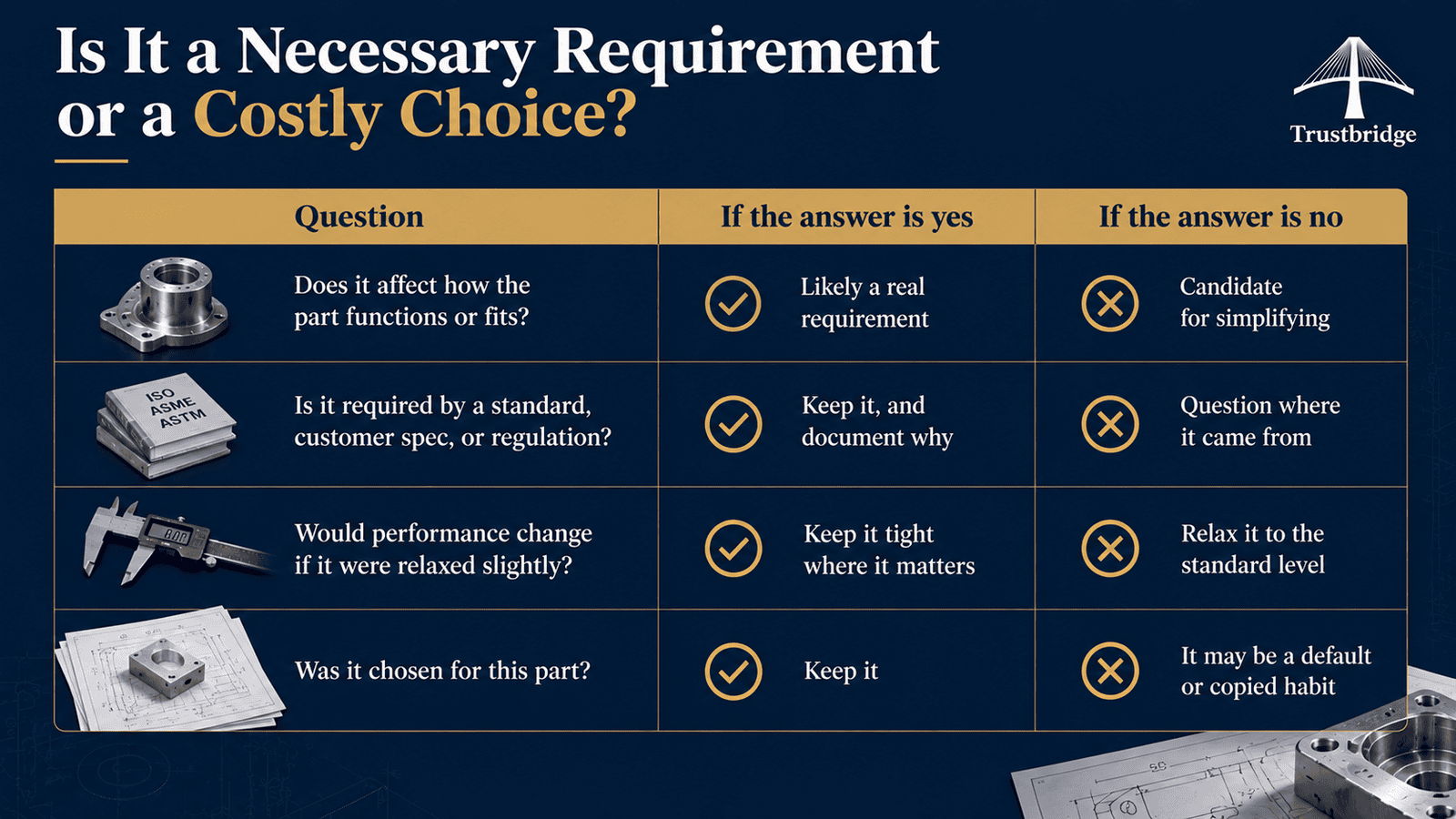
For each feature or callout that drives cost, ask a few questions:
Question | If the answer is yes | If the answer is no |
Does it affect how the part functions or fits? | Likely a real requirement | Candidate for simplifying |
Is it required by a standard, customer spec, or regulation? | Keep it, and document why | Question where it came from |
Would performance change if it were relaxed slightly? | Keep it tight where it matters | Relax it to the standard level |
Was it chosen for this part? | Keep it | It may be a default or copied habit |
Many costly features come from habits rather than decisions: a tolerance block carried over from an old template, a material chosen because it was used last time or a sharp corner left because it was the CAD default. Those are the easiest savings to find.
When a feature is truly necessary, keep it, and make sure it's clearly marked as critical on the drawing. That helps the manufacturer focus on effort and inspection where it matters most and relax where it doesn't.
Making DFM part of the design process
DFM works best as a step in design, not as a fix after quotes come back high. When manufacturability is reviewed while the design is still taking shape, every improvement is cheaper, faster, and easier to make. A simple rhythm helps. Review manufacturability once the concept is defined, again before the first prototype and again before releasing drawings for production. At each stage, look for the warning signs above, check whether the process still matches the material, geometry and expected volume, and confirm that every tight tolerance and special feature has a reason behind it.
At Trustbridge, DFM is built into how our design team works. Our engineers bring practical feedback from manufacturing specialists into the design process, so teams can assess and refine a part geometry, tolerances, materials and process before it goes to production. The aim is a design that does exactly what it needs to and is straightforward to make well.
The result isn't a less capable part. It's the same part, designed with production in mind, which usually means lower cost, shorter lead times, and fewer surprises between prototype and production.
Working on a part that seems harder or more expensive to make than it should be? Talk to our design team about a design-for-manufacturability review.
Frequently asked questions
What does a DFM review usually include?
A DFM review typically looks at a part's geometry, tolerances, materials, finishes and intended production volume. The output is usually a list of the main cost and risk drivers, with specific suggestions such as adding a corner radius, relaxing a tolerance or changing a material, plus notes on which process best fits the part.
Does designing for manufacturability mean lowering quality or performance?
No. Good DFM keeps everything the part needs to do and removes cost that doesn't contribute to function. Critical features stay tight and well defined, while non-critical features are simplified so the shop can focus its effort where it matters.
What is the difference between DFM and DFA?
DFM (design for manufacturing) focuses on making individual parts easier and cheaper to produce. DFA (design for assembly) focuses on making the full product easier to put together, often by reducing part count, simplifying fasteners and making parts easier to orient. Many teams consider both together.
How should critical features be shown on a drawing?
Use clear tolerances and GD&T on the features that affect function or fit, and keep general tolerances for everything else. Many teams also mark critical-to-function features explicitly, so manufacturers know where to focus inspection and where a standard process is fine.
Is DFM useful for prototypes, or only for production?
Both. Even a prototype can be designed to be cheaper and faster to make, and building prototypes with production in mind makes the move to higher volumes much smoother. The biggest savings, though, usually come from reviewing designs before tooling or production runs are committed.